
JSON是什么?百度百科是这么解释的。
JSON(JavaScript Object Notation) 是一种轻量级的数据交换格式。它基于ECMAScript的一个子集。 JSON采用完全独立于语言的文本格式,但是也使用了类似于C语言家族的习惯(包括C、C++、C#、Java、JavaScript、Perl、Python等)。这些特性使JSON成为理想的数据交换语言。 易于人阅读和编写,同时也易于机器解析和生成(一般用于提升网络传输速率)。
为了不和时代落伍,我们必须要学习 XML 和 JSON,但同时它们也很容易学习。也可以加入我们的JSON大军:QQ群:259217951
XML很好很强大,但是最近有另外一个时代弄潮儿,这就是JSON。现在JSON的光环已经逐渐超越了XML,各大网站提供的数据接口一般都是JSON。下面我们就来学习下JSON。



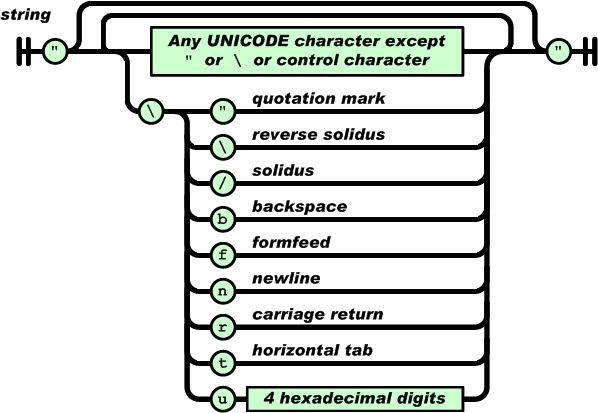
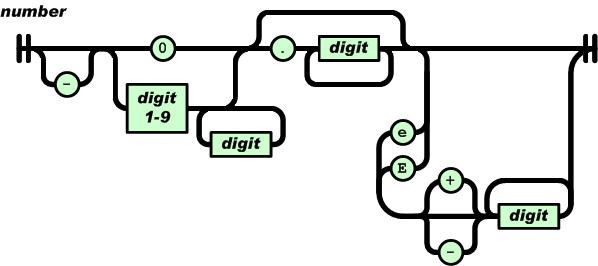
上面关于JSON讲了这么多,大家都表示一头雾水了吧?
没关系,我们来举个栗子,让大家有个直观的感受:–)
以目前视频使用的iQiyi提供的频道接口为例:
{"code": 1,
    "data": 0,
    "albumIdList": [
            {
                    "totalidnum": 2000,
                    "idlist": [
                            "319281600"
                    ]
            }
    ],
    "albumArray": {
            "319281600": {
                    "_as": "",
                    "_blk": 0,
                    "_cid": 1,
                    "_ct": "2014-10-10 17:55:06",
                    "_da": "",
                    "_dl": 0,
                    "_dn": "7296",
                    "_id": 319281600,
                    "_img": "http://pic2.qiyipic.com/image/20141016/19/ca/v_108628048_m_601_m1_120_160.jpg",
                    "_ip": 1,
                    "_ma": "",
                    "_pc": 2,
                    "_pid": 0,
                    "_reseftv": 959,
                    "_t": "末代独裁",
                    "_tvct": 1,
                    "_tvs": 1,
                    "_vt": 0,
                    "a_av": 1,
                    "a_pro": "",
                    "bpt": "0",
                    "clm": "",
                    "cn_year": "0",
                    "co_album_id": "0",
                    "ctype": 0,
                    "desc": "",
                    "down": 0,
                    "down2": "0",
                    "drm": 0,
                    "fst_time": "2014-10-16",
                    "h1_img": "http://pic2.qiyipic.com/image/20141016/19/ca/v_108628048_m_601_m1_180_236.jpg",
                    "h2_img": "http://pic2.qiyipic.com/image/20141016/19/ca/v_108628048_m_601_m1_195_260.jpg",
                    "is_h": 0,
                    "is_n": 0,
                    "is_zb": 0,
                    "k_word": "",
                    "language": 0,
                    "live_center": 0,
                    "live_start_time": 0,
                    "live_stop_time": 0,
                    "logo": 1,
                    "m_av": 1,
                    "p_av": 1,
                    "p_s": 0,
                    "p_s_1": 0,
                    "p_s_4": 0,
                    "p_s_8": 0,
                    "qiyi_pro": 0,
                    "qiyi_year": "0",
                    "qt_id": "1005722",
                    "s_TT": "",
                    "songname": "",
                    "t_pc": 1,
                    "tag": "当代 美国 乡村 大片",
                    "tv_eftv": 1,
                    "tv_pha": "",
                    "tv_pro": "",
                    "tv_ss": "",
                    "tvfcs": "雄心壮志背后的真相",
                    "up": 0,
                    "up2": "0",
                    "upcl": "",
                    "v2_img": "http://pic2.qiyipic.com/image/20141016/19/ca/v_108628048_m_601_m1_284_160.jpg",
                    "v3_img": "http://pic2.qiyipic.com/image/20141016/19/ca/v_108628048_m_601_m1_480_270.jpg",
                    "vv": "1",
                    "year": "2007",
                    "tv_id": "0",
                    "vv_p": 0,
                    "vv_f": 2,
                    "vv_m": 0,
                    "_sc": 8
            }
    },
    "changeAlbum": null,
    "category": null,
    "before": "2~4~1~7~3",
    "latest_push_id": "655",
    "up_tm": "1413441370874",
    "recommend_attach": "",
    "preset_keys": null,
    "category_group": null,
    "exp_ts": 120,
    "stfile_path": "/data/view/online5/0/1/2.1.8.5.1.txt"
}
Android JSON所有相关类,都在org.json包下。
包括JSONObject、JSONArray、JSONStringer、JSONTokener、JSONWriter、JSONException。
目前JSON解析有2种方法,分别是get和opt方法,可以使用JSON
那么使用get方法与使用opt方法的区别是?
JsonObject方法,opt与get建议使用opt方法,因为get方法如果其内容为空会直接抛出异常。不过JsonArray.opt(index)会有越界问题需要特别注意。
opt、optBoolean、optDouble、optInt、optLong、optString、optJSONArray、optJSONObject get、getBoolean、getDouble、getInt、getLong、getString、getJSONArray、getJSONObject
在Android中应该如何创建JSON呢?
下面展示了一个如何创建JSON的例子:
private String createJson() throws JSONException {
    JSONObject jsonObject = new JSONObject();
    jsonObject.put("intKey", 123);
    jsonObject.put("doubleKey", 10.1);
    jsonObject.put("longKey", 666666666);
    jsonObject.put("stringKey", "lalala");
    jsonObject.put("booleanKey", true);

    JSONArray jsonArray = new JSONArray();
    jsonArray.put(0, 111);
    jsonArray.put("second");
    jsonObject.put("arrayKey", jsonArray);

    JSONObject innerJsonObject = new JSONObject();
    innerJsonObject.put("innerStr", "inner");
    jsonObject.put("innerObjectKey", innerJsonObject);

    Log.e("Json", jsonObject.toString());

    return jsonObject.toString();
}
其输出结果如下所示(JSON格式化后的结果):
{
    "intKey": 123,
    "doubleKey": 10.1,
    "longKey": 666666666,
    "stringKey": "lalala",
    "booleanKey": true,
    "arrayKey": [
        111,
        "second"
    ],
    "innerObjectKey": {
        "innerStr": "inner"
    }
}
下面以视频中解析iQiyi的每个视频album数据为例来说明如何解析JSON:
第一步,需要从网络服务器上发起请求,获取到JSON数据:
JsonObjectRequest jsonObjRequest = new JsonObjectRequest(Request.Method.GET, url, null,
        new Response.Listener<JSONObject>() {
            @Override
            public void onResponse(JSONObject response) {
                try {
                    MyLog.d(TAG, "response=" + response);
                    parseiQiyiInterfaceResponse(response);
                } catch (Exception e) {
                    e.printStackTrace();
                }
            }
        }, new Response.ErrorListener() {
            @Override
            public void onErrorResponse(VolleyError error) {
                /*
                 * if (error instanceof NetworkError) { } else if (error
                 * instanceof ClientError) { } else if (error instanceof
                 * ServerError) { } else if (error instanceof
                 * AuthFailureError) { } else if (error instanceof
                 * ParseError) { } else if (error instanceof
                 * NoConnectionError) { } else if (error instanceof
                 * TimeoutError) { }
                 */
                MyLog.e(TAG, "onErrorResponse, error=" + error);
            }
        }) {
    @Override
    public Map<String, String> getHeaders() throws AuthFailureError {
        HashMap<String, String> headers = new HashMap<String, String>();
        headers.put("t", iQiyiInterface.getEncryptTimestamp());
        headers.put("sign", iQiyiInterface.getSign());

        return headers;
    }
};
第二步,获取到对应的对应的JSONObject数据:
public void getJsonObjectString(String url) {
    mQueue = VideoApplication.getInstance().getRequestQueue();

    JsonObjectRequest jsObjRequest = new JsonObjectRequest(Request.Method.GET, url, null,

    new Response.Listener<JSONObject>() {

        @Override
        public void onResponse(JSONObject response) {
            MyLog.e(TAG, "response = " + response.toString());

            JSONArray jsonArray = null;
            JSONObject jsonObject = null;
            try {
                jsonObject = response.getJSONObject("response");
                jsonArray = jsonObject.getJSONObject("result").getJSONArray("album");
            } catch (JSONException e) {
                e.printStackTrace();
            }

            if (jsonArray == null) {
                return;
            }

            mChannelList = VideoUtils.parseVideoJsonArray(jsonArray);

            if (isLoading) {
                isLoading = false;
                if (mIsGrid) {
                    mChannelGridAdapter.appendChannelVideoInfo(mChannelList);
                } else {
                    mChannelListAdapter.appendChannelVideoInfo(mChannelList);
                }

            } else {
                if (mIsGrid) {
                    mChannelGridAdapter.setChannelVideoInfo(mChannelList);
                    showOppoGrid();
                } else {
                    mChannelListAdapter.setChannelVideoInfo(mChannelList);
                    showOppoList();
                }
            }
        }
    }, new Response.ErrorListener() {

        @Override
        public void onErrorResponse(VolleyError error) {
            MyLog.e(TAG, "error = " + error);
        }
    });

    jsObjRequest.setTag(TAG);
    jsObjRequest.setShouldCache(true);
    mQueue.add(jsObjRequest);
    mQueue.start();
}
获取到JSON Object之后,就对这个JSONObject进行解析:
private ArrayListparseVideoAlbumJsonObject(JSONObject albumJSONObject, ArrayList albumIdJSONArrayList) { MyLog.d(TAG, "parseVideoAlbumJsonObject, length=" + albumJSONObject.length()); if (albumJSONObject.length() < 1) { return null; } ArrayList<VideoConstant> videos = new ArrayList<VideoConstant>(); try { for (int index = 0; index < albumJSONObject.length(); index++) { VideoConstant video = new VideoConstant(); JSONObject itemJsonObject; itemJsonObject = albumJSONObject.getJSONObject(albumIdJSONArrayList.get(index) .toString()); MyLog.d(TAG, "string=" + albumIdJSONArrayList.get(index).toString()); video.mAlbumId = itemJsonObject.optString(InterfaceParameterName.ID); video.mAtitle = itemJsonObject.optString(InterfaceParameterName.TITLE); video.mEpisodeCount = itemJsonObject.optString(InterfaceParameterName.UPDATE_SET); video.mTvSets = itemJsonObject.optString(InterfaceParameterName.TV_SETS); video.mDesc = itemJsonObject.optString(InterfaceParameterName.DESCRIPTION); video.mCid = itemJsonObject.optString(InterfaceParameterName.CATEGORY_ID); video.mImg = itemJsonObject.optString(InterfaceParameterName.IMG); video.mHighimg = itemJsonObject .optString(InterfaceParameterName.HIGH_RESO_PORT_IMG); video.mHoriImg = itemJsonObject .optString(InterfaceParameterName.HIGH_RESO_HORI_IMG); video.mScore = itemJsonObject.optString(InterfaceParameterName.SCORE); video.mMainActors = itemJsonObject.optString(InterfaceParameterName.MAIN_ACTOR); video.mCreateTime = itemJsonObject.optString(InterfaceParameterName.CREATE_TIME); video.mDuration = itemJsonObject.optString(InterfaceParameterName.DURATION); video.mTag = itemJsonObject.optString(InterfaceParameterName.TAG); MyLog.d(TAG, "id=" + video.mAlbumId + ",title=" + video.mAlbumTitle + ",img=" + video.mHighimg + ",tvsets=" + video.mTvSets); videos.add(video); } } catch (JSONException e) { e.printStackTrace(); } return videos; }
上面介绍都是使用Android提供的原生类解析JSON,最大的好处是项目不需要引入第三方库,但是如果比较注重开发效率而且不在意应用大小增加几百K的话,有以下JSON可供选择:
大家可以去对应的官网下载并学习
JSON和XML就像武林界的屠龙刀和倚天剑,那么他们孰强孰弱?
XML长期执数据传输界之牛耳,而JSON作为后起之秀,已经盟主发起了挑战。
那就让他们来进行PK一下:
总之: JSON 比 XML 更小、更快,更易解析。
XML的主要组成成分:
XML是element、attribute和element content。
JSON的主要组成成分:
JSON是object、array、string、number、boolean(true/false)和null。
XML要表示一个object(指name-value pair的集合),最初可能会使用element作为object,每个key-value pair 用 attribute 表示:
<student name="soゝso" age="27"/>
但如个某个 value 也是 object,那么就不可以当作attribute:
<student name="soゝso" age="27">
    <address>
        <country>中国</country>
        <province>北京市</province>
        <city>朝阳区</city>
        <district>北京市朝阳区东四环远洋国际中心A座1906 </district>
    </address>
</student>
那么,什么时候用element,什么时候用attribute,就已经是一个问题了。
而JSON因为有object这种类型,可以自然地映射,不需考虑上述的问题,自然地得到以下的格式。
{
    "name": "John",
    "age" : 10,
    "address" : {
        "country" : "中国",
        "province" : "北京市",
        "city" : "朝阳区",
        "district" : "北京市朝阳区东四环远洋国际中心A座1906",
    }
}
One More Thing…
XML需要选择怎么处理element content的换行,而JSON string则不须作这个选择。
XML只有文字,没有预设的数字格式,而JSON则有明确的number格式,这样在locale上也安全。
XML映射数组没大问题,就是数组元素tag比较重复冗余。JSON 比较易读。
JSON的true/false/null也能容易统一至一般编程语言的对应语义。
XML文档可以附上DTD、Schema,还有一堆的诸如XPath之类规范,使用自定义XML元素或属性,能很方便地给数据附加各种约束条件和关联额外信息,从数据表达能力上看,XML强于Json,但是很多场景并不需要这么复杂的重量级的东西,轻便灵活的Json就显得很受欢迎了。
打个比方,如果完成某件事有两种方式:一种简单的,一个复杂的。你选哪个?
JSON与XML相比就是这样的。
这篇文章只是对XML和JSON这2种目前主流使用的数据格式进行了解释,并系统的学习了其中的语法及如何进行解析,同时在最好针对XML和JSON做了对比,了解其不同点和各自的优势。
期望有需要的朋友有所帮助。
转载请注明出处:https://www.sojson.com/in.html
支付宝 && 微信付款 二维码,赞助后我们会署名显示:赞助列表